Saturday, October 13, 2018

GST TAX SETUP IN ORACLE APPS

GST TAX SETUP IN ORACLE APPS
Contents
Define Item classification        
Define Template for Item classification        
Assign template to items        
Verify if attribute from template are assigned to part        

Define Item classification

(N) Oracle Financials for India >> Item Definition >> Define Item Classification
This is a mandatory setup for all the part where tax based transactions are expected for the part.

Define Template for Item classification

 
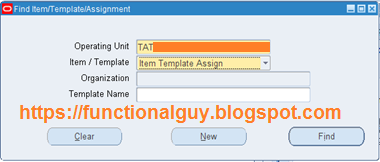
Click on New to define template. If template already defined then click on Find.
NOTE: RECOVERABLE attribute box value plays important role in recoverability of Tax. But remember tax recoverability depends on attributes mentioned at three different levels (Item classification, Tax type definition and Claim term).
You may refer one of related article How to make India GST regime tax entry as recoverable in Oracle EBS?
   
Values for item classification are maintained in Asia look up code “JAI_ITEM_CLASS_CD”
This is seeded lookup comes with many pre-defined entries, if required, we can add ours or disabled some.
Oracle has confirmed that these values will not play any role in the process as such in GST, like in excise if the part is marked as OTIN then taxes for that part are not CENVATable, if a part is marked as CGIN then 50% CENVAT credit done in 1st year and rest 50% in 2nd year. Whereas in GST case this will not be considered in taking any system based decision.
        Saying that Oracle may change it and include it in upcoming versions of GST patch as even in case of GST there is different treatment for Capital in case of OSP and so on!
Assign Reporting code (this is optional), but is we need to have Rule based ‘Tax defaulting’ then we have to do this setup.
 

Assign template to items

Then click on New to assigned template
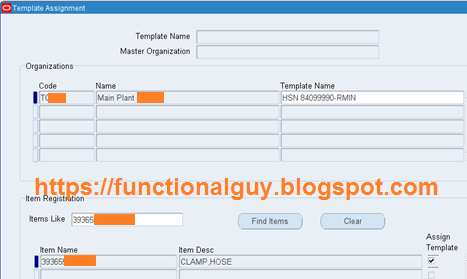
Put the Template name in below screen, select Master Org and move to Organization section.
Here select the organization for which you want to assign template.
In ‘Item Registration’ section you may query specific part of put starting of the part number and find it.
Then ‘Save’ the record to apply template to those parts.
 

Verify if attribute from template are assigned to part

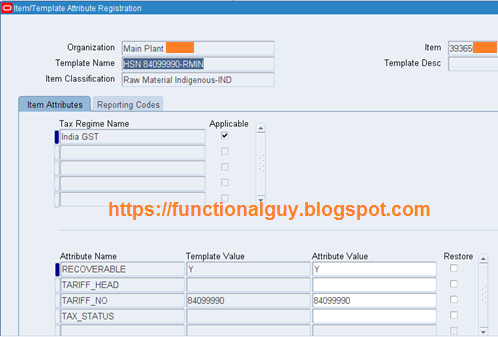
Here it is, applied template is appearing as well along with the values.
Further if we want to change the value we can do it
You may directly define Item classification at item level as well without using template.

Thursday, October 11, 2018

How to release Order Holds using API

Question: How to release Order Holds using API
   Answer:    Releasing Order Holds – API
If you have many orders on hold and want to use API to release all holds in one shot then user Hold API.
–==================== SQL Script Start =========
CREATE OR REPLACE PROCEDURE XXOST_ReleaseHolds(p_user_name         VARCHAR2,
                                               p_order_num_low     NUMBER,
                                               p_order_num_high    NUMBER
                                               )
IS
   –============================================================
   — Created By Ravindra Tripathi (OptioSys Technologies Inc.)
   — Created on 14-Apr-2011
   — Purpose: Releasing Order holds
   –============================================================
 
   CURSOR cur_orders_hold
   IS 
      SELECT 
               hdra.header_id
               ,hdra.order_number
               ,hsrc.hold_source_id
               ,hsrc.hold_id
        FROM   oe_order_headers_all hdra,
               oe_order_holds_all hlda,
               oe_hold_sources_all hsrc,
               oe_hold_definitions hdef
       WHERE   1=1
               AND hdra.order_number BETWEEN p_order_num_low AND p_order_num_high
               AND hdra.header_id = hlda.header_id
               AND hlda.hold_source_id = hsrc.hold_source_id
               AND hsrc.hold_id = hdef.hold_id
               AND hlda.released_flag=’N’;
   p_hold_source_rec    OE_HOLDS_PVT.hold_source_rec_type;
   p_hold_release_rec   OE_HOLDS_PVT.Hold_Release_Rec_Type;
   p_order_tbl          OE_HOLDS_PVT.order_tbl_type;
   idx                  NUMBER;
   x_return_status     VARCHAR2 (1);
   x_msg_count         NUMBER;
   x_msg_data          VARCHAR2 (2000);
  — Sub Program
   –Apps Initialize
   PROCEDURE apps_initialize (p_user_name          VARCHAR2,
                              p_resp_key           VARCHAR2,
                              px_err_msg    IN OUT VARCHAR2
                             )
   IS
 
      l_user_id   NUMBER;
      l_resp_id   NUMBER;
      l_appl_id   NUMBER;
    
   BEGIN
      px_err_msg := NULL;
      –Get User ID based upon User Name;
      SELECT   user_id
        INTO   l_user_id
        FROM   fnd_user
       WHERE   user_name = p_user_name;
        –Get User ID based upon User Name;
      SELECT   responsibility_id, application_id
        INTO   l_resp_id, l_appl_id
        FROM   fnd_responsibility
       WHERE   responsibility_key = p_resp_key;
      FND_GLOBAL.apps_initialize (l_user_id, l_resp_id, l_appl_id);
    
      DBMS_OUTPUT.put_line (‘User ID:’||l_user_id);
      DBMS_OUTPUT.put_line (‘Responsibility ID:’ || l_resp_id);
      DBMS_OUTPUT.put_line (‘Application ID:’||l_appl_id);
 
 
   exception
   when others then
   px_err_msg:=’ExpErr:apps_initialize:’||SQLERRM; 
   END;
 
    
BEGIN
   — Main Program  
   OE_MSG_PUB.initialize;
   apps_initialize(p_user_name, ‘ORDER_MGMT_SUPER_USER’, x_msg_data);
   IF x_msg_data IS NOT NULL
   THEN
      DBMS_OUTPUT.put_line (‘Init call failed. Error:’||x_msg_data);
      RETURN;
   END IF;
  x_msg_data:=null;
   — Loop through each order and unrealed holds
 
   FOR l_hold_rec IN cur_orders_hold
   LOOP
 
      p_order_tbl (1).header_id := l_hold_rec.header_id;
      oe_holds_pub.Release_Holds (
             p_api_version           => 1.0,
             p_order_tbl             => p_order_tbl,
             p_hold_id               => l_hold_rec.hold_id,
             p_release_reason_code   => ‘OTHER’,
             p_release_comment       => ‘Released Through Release Hold API Call’,
             x_return_status         => x_return_status,
             x_msg_count             => x_msg_count,
             x_msg_data              => x_msg_data
            );
       DBMS_OUTPUT.put_line (‘===== API Status for Order Number :’||l_hold_rec.order_number||’ =====’);
       DBMS_OUTPUT.put_line (‘Return Status = ‘ || x_return_status);
       DBMS_OUTPUT.put_line (‘Message Count = ‘ || x_msg_count);
       DBMS_OUTPUT.put_line (‘Message Data = :’ || x_msg_data || ‘:’);
   END LOOP;
   — Look for Any error messages from API
   FOR j IN 1 .. OE_MSG_PUB.count_msg
   LOOP
    
      OE_MSG_PUB.get (p_msg_index       => j,
                      p_encoded         => ‘F’,
                      p_data            => x_msg_data,
                      p_msg_index_out   => idx);
      DBMS_OUTPUT.put_line (‘Error: ‘ || j || ‘:’ || x_msg_data);
    
   END LOOP;
exception
when others then
x_return_status:=’E’;
x_msg_data :=’ExpErr:XXOST_ReleaseHolds. Error:’||sqlerrm;
DBMS_OUTPUT.put_line (‘ExpErr:XXOST_ReleaseHolds. Error:’||sqlerrm);
 
END XXOST_ReleaseHolds;
–==================== SQL Script End =========

Releasing Holds In Oracle Apps

Releasing Holds

You can release holds on specific orders, returns, or lines; release a hold source that holds many orders or lines; and view information about holds that you have already released. If a hold was defined with specific hold authorizations, you must be logged in as one of the responsibilities permitted to remove this hold.
After you release all order and order line or return and return line holds, that order or return becomes available for any subsequent cycle actions as it meets cycle action prerequisites. If you release a hold source, the hold is automatically released for all appropriate orders, returns, or their lines.
Holds are released automatically when you run the Close Orders program on or after the date that the hold source expires. This date is defined in the Hold Until Date field in the Hold Sources window.
Use the Find Holds window to select the orders, returns, lines, or hold sources to release. When you choose the Orders or Lines buttons, Order Entry/Shipping queries all the orders, returns, or lines that match your criteria and that are or have been on hold. When you choose the Hold Sources button, Order Entry/Shipping queries hold sources that were created using the criteria you specify.

   To view or release a hold source:

    1. Navigate to the Find Holds window.
    2. Enter search criteria, including the hold parameter and value or the name of the hold.
    3. Choose the Hold Sources button to query the hold sources that meet your search criteria.
    The results display in the Hold Sources window.
    4. Enter a Release Reason for the hold source you want to release and choose the Mark for Release button.
    You can select several hold sources before choosing Mark for Release. Order Entry/Shipping applies the reason and comment you enter to each selected source.
    5. Save your work.
    Each order or return affected by the released hold source is released automatically.

   To release a hold on a particular order or return:

    1. Navigate to the Find Holds window.
    2. Select the parameter Order and the order or return number that you want to release.
    3. Choose the Orders button to query the holds placed against the order or return.
    The results display in the Orders and Returns window.
    4. Optionally choose the View Lines button to review the lines for the order or return.
    5. If you want to release only one hold, enter a Release Reason for the order or return you want to release and optionally enter a comment.
    6. If you want to release several holds at once, select the desired holds and choose the Mark for Release button to apply the same reason and comment to each selected entry. See: Selecting Multiple Records.
    7. Save your work.

   To release a hold on a specific order line or return line:

    1. Navigate to the Find Holds window.
    2. Select the parameter Order and the order or return number whose lines you want to release.
    3. Choose the Lines button to query the holds placed against the order or return.
    The results display in the Order and Return Lines window.
    4. If you want to release only one hold, enter a Release Reason for the line you want to release and optionally enter a comment.
    5. If you want to release several holds at once, select the desired holds and choose the Mark for Release button to apply the same reason and comment to each selected entry. See: Selecting Multiple Records.
    6. Save your work.

   To view or release holds for a particular customer:

    1. In the Find Holds window, enter search criteria and select Customer as your hold parameter
    2. Choose the appropriate button, depending on whether you want to view search results by line, order, or hold source.
    The Orders and Returns window and the Order and Return Lines window display all the orders, returns, or lines for a given customer that are or have been on hold. Note that the hold may have been applied for an item, order, site, or customer.
    The Hold Sources window displays all hold sources created for a customer using the Customer parameter.
    3. Enter a Release Reason for the entry you want to release or select several entries at once, then choose the Mark for Release button.
    4. Save your work.

   To view or release all orders, returns, or lines for a particular hold:

    1. In the Find Holds window, leave the hold parameter field blank and enter only a hold name.
    2. Choose the appropriate button, depending on whether your hold operates at the line level or order level.
    3. Enter a Release Reason for the entry you want to release or select several entries at once, then choose the Mark for Release button.
    4. Save your work.

Oracle Application Express New Features in Release 5.1

Oracle Application Express

New Features in Release 5.1

Oracle Application Express 5.1 is a great leap forward in end user productivity and introduces powerful new declarative features, enabling you to develop, design and deploy beautiful, responsive, database-driven desktop and mobile applications using only a browser.

Quotes

"At Insum, we are very excited with the upcoming APEX 5.1 release. The new declarative Master-Detail-Detail capabilities, possible using the new Interactive Grid, will greatly assist many of our clients convert legacy applications to Oracle Application Express. I am not even mentioning the hundreds of new improvements that the APEX team delivers with each new release" said Francis Mignault, co-founder, CTO, Insum Solutions.
"Oracle Application Express will allow you to build any data-driven web application with less effort as compared to traditional programming languages. The added Interactive Grid component in APEX 5.1 will extend the capabilities of Application Express, thereby covering even the most complex requirements for dialogs out-of-the-box. I therefore foresee a great uptake of customers that will migrate their legacy apps to Application Express" said Niels de Bruijn, Business Unit Manager and Oracle Ace Director, MT AG, Germany.

Introducing Interactive Grid

Interactive Grid is a rich, client-side region type that allows rapid editing of multiple rows of data in a dynamic, JSON-enabled grid. Interactive Grid combines the best features from both Interactive Reports and Tabular Forms. From a functional perspective, an Interactive Grid includes the majority of customization capabilities available in Interactive Reports, plus the ability to resize columns and rearrange the column order directly in the report using drag and drop. You can create both read-only and editable Interactive Grids. In an editable Interactive Grid, users can add, modify, and delete data directly on the page. Built using modern guidelines and techniques, this new component of Application Express provides outstanding keyboard support and usability. Existing tabular forms can be migrated to Interactive Grids using the Upgrade Application wizard.
  • Full Featured GridInteractive Grid includes all the features you expect for powerful reporting, including fixed headers, frozen columns, scroll pagination, multiple filters, sorting, aggregates, and more.
  • Extensible and CustomizableYou can easily edit your data using text, numerical columns, date pickers, list of values, and much more. Interactive Grid is designed to support all item types and item type plug-ins.
  • Master > Detail > Detail > DetailWith Interactive Grids, you can now easily render master-detail-detail relationships that can be n-levels deep or across. You can create all types of master-detail-detail screens with ease.

Oracle JET Charts Integration

The data visualization engine of Oracle Application Express 5.1 is now powered by Oracle JET (JavaScript Extension Toolkit), a modular open source toolkit based on modern JavaScript, CSS3 and HTML5 design and development principles. This JavaScript charting solution is highly customizable, accessible, interactive, and incorporates automatic responsive design support. With Oracle JET integration into Application Express, you can now build charts that are beautiful, fast, highly customizable, and extremely versatile. The Oracle JET data visualization components include customizable charts, gauges, and other components that you can use to present flat or hierarchical data in a graphical display for data analysis.
  • Fully HTML5These charts are fully HTML5 capable and work on any modern browser, regardless of platform, or screen size.
  • Easy MigrationsExisting AnyChart charts can be migrated using the Upgrade Application wizard.
  • Data VisualizationThe charts provide dozens of different ways to visualize a data set including bar, line, area, range, combination, scatter, bubble, polar, radar, pie, funnel, and stock charts.
  • InteractivityEach Oracle JET visualization supports animation, accessibility, responsive layout, internationalization, test automation, and a range of interactivity features.

Universal Theme and User Experience Enhancements

Application Express 5.1 builds on the success of the Universal Theme and introduces new templates, theme styles and Live Template Options. Universal Theme has been streamlined and features improved design and UI throughout all of its components.
  • Declarative Right-to-Left SupportApplication Express 5.1 adds support for declarative right-to-left languages to be properly rendered when using Universal Theme.
  • Per-User Theme Style PreferenceYou can now set a per-user-level preference for theme styles.
  • Live Template OptionsYou can now modify template options for your page components when running the application. Just like Theme Roller, Live Template Options enables you to customize your application in real time, allowing you to try out various template options to get the perfect UI for your application.
  • Font APEX Icon LibraryFont APEX is a new icon library with 1100+ icons designed as 16x16 line icons. It is specifically designed to complement the development of business applications with Oracle Application Express and Universal Theme.
  • Modal Dialog Auto ResizeModal Dialogs in Universal Theme will automatically grow or shrink in height to fit the contents of your modal dialog contents.
  • Icons for Items and Inline Item Help TextFor supported item types, you can now easily select an icon and have it displayed near your item. You can now provide inline help text for your items with the new Inline Help Text attribute. This text will then be displayed immediately below your item.
  • Custom Application Icons in BuilderYou can now set an image for your application to be used in the App Builder.
  • Asynchronous Dynamic ActionsAll AJAX requests issued by Dynamic Actions are now asynchronous which allows progress indicators, and so forth, to be displayed for long running transactions.

Enhanced Page Designer: Transition to Page Designer Made Easy!

  • Integration of Component ViewTo assist developers with the transition to Page Designer, a new Component View tab is now included in Page Designer. You can see your page as it looks when viewing the Legacy Component View simply by selecting the Component View tab in the middle pane of Page Designer. The visual representation of your page matches the layout of Component View. However, instead of going back and forth between property pages to make changes, you can now modify your attributes using the Property Editor tab in Page Designer.
  • Two Pane ModePage Designer now supports a Two Pane mode so you can focus on two panes at a time.
  • Drag and Drop Tab ReorderingYou can now customize Page Designer by reordering tabs within and across panes.
  • Property Editor: Filter Search and Changed Property IndicatorYou can now quickly search and find a specific attribute or group in the Property Editor by entering part or all of the associated property name in the search dialog. In the Property Editor, changed properties are now indicated with a blue marker until the page has been saved.

Wizard Simplification

In Oracle Application Express 5.1, wizards have been streamlined with smarter defaults and fewer steps, enabling developers to create components quicker than ever before.
  • Create Application WizardThe Create Application Wizard for desktop applications now supports the creation of interactive grid pages as reports, forms, and master detail. When you create an application from a spreadsheet, the wizard now supports the creation of an interactive grid as either a single page, or report and form page.
  • Create Page WizardThe Create Page Wizard features a more consistent, streamlined interface consisting of fewer steps. Master Detail wizards now support incorporating an interactive grid region on either a single page or on two pages. Tabular Form, AnyChart Chart, and Legacy Calendar now appear under Legacy Page type.

Packaged Apps

Oracle Application Express 5.1 includes enhancements to all existing productivity and sample apps, and also introduces three new productivity apps - Competitive Analysis, Quick SQL and REST Client Assistant:
  • Competitive AnalysisCompetitive Analysis can be used to create side-by-side comparisons which can be edited by many users simultaneously. These comparisons can be scored and displayed in aggregated chart form, or in a more detailed text form.
  • Quick SQLThis app provides a quick and intuitive way to generate a relational SQL data model based on text in a markdown-like format. Additionally, the app provides many options to generate SQL including generating triggers, APIs and history tables.
  • REST Client AssistantREST Client Assistant enables developers to access RESTful services defined in both Application Express workspaces and public services. The app provides metadata-driven mapping from service response data to SQL result set columns. The generated SQL and PL/SQL code can then be used directly in Oracle Application Express applications.
Improvements have been made to all of the Sample and Productivity apps, capitalizing on the new functionality of Oracle Application Express 5.1. The Sample Charts app has been completely revamped to showcase the all new Oracle JET Charts and is an outstanding demonstration of the data visualization capabilities in Oracle Application Express 5.1. The Sample Master-Detail app now highlights the different ways related tables can be displayed using a marquee page or different combinations of Interactive Grids. This release also includes three new Sample apps: Sample Interactive Grids, Sample Projects, and Sample REST Services:
  • Sample Interactive GridsThis application highlights the features and functionality of the new Interactive Grid. The sample pages highlight the following features: Read Only capabilities, Pagination options, Editing capabilities, and Advanced techniques
  • Sample ProjectsThe Sample Projects application is an application that highlights the new features in Oracle Application Express 5.1, such as Interactive Grid and JET charts.
  • Sample REST ServicesThis application showcases how to access external REST services from Oracle Application Express pages.

Calendar Enhancements

There are numerous improvements to Calendar in this release:
  • End Date Displayed InclusivelyIn release 5.0, the CSS calendar considered the end date of an all-day event as exclusive (similar to the jQuery FullCalendar Plugin ). In release 5.1, the end date is inclusive like all other Oracle Application Express components.
  • JavaScript CustomizationYou can add JavaScript code to support customization of the FullCalendar initialization using the new Initialization JavaScript Code attribute
  • Dynamic Actions EventsEnables developers to capture events within the calendar and define dynamic actions against these events.
  • Keyboard SupportWhen the calendar grid has focus, the arrow keys can be used to navigate within the calendar.

Other Enhancements

  • Page SubmitNew Page Attribute "Reload On Submit" allows developers to specify when the page should be reloaded following a page submission. Submitting a page has been changed to not use the parameters of the wwv_flow.accept procedure anymore, instead all page item values are stored in a JSON document which is passed to wwv_flow.accept. With this change,there is no more 200 page items limit per page.
  • APEX Builder UI EnhancementsRather than just being able to upload a single file (or zip file), developers can now upload multiple files or multiple zip files. This is available in Static Workspace Files, Static Application Files, Theme Files, and Plug-In Files.
  • Item TypesFile Browse page items can be configured to support multiple file uploads, and can be restricted by file types.

Announcing Oracle APEX 18.1 New Features

Announcing Oracle APEX 18.1


Oracle Application Express (APEX) 18.1 is now generally available! APEX enables you to develop, design and deploy beautiful, responsive, data-driven desktop and mobile applications using only a browser. This release of APEX is a dramatic leap forward in both the ease of integration with remote data sources, and the easy inclusion of robust, high-quality application features.
Keeping up with the rapidly changing industry, APEX now makes it easier than ever to build attractive and scalable applications which integrate data from anywhere - within your Oracle database, from a remote Oracle database, or from any REST Service, all with no coding.  And the new APEX 18.1 enables you to quickly add higher-level features which are common to many applications - delivering a rich and powerful end-user experience without writing a line of code.
"Over a half million developers are building Oracle Database applications today using  Oracle Application Express (APEX).  Oracle APEX is a low code, high productivity app dev tool which combines rich declarative UI components with SQL data access.  With the new 18.1 release, Oracle APEX can now integrate data from REST services with data from SQL queries.  This new functionality is eagerly awaited by the APEX developer community", said Andy Mendelsohn, Executive Vice President of Database Server Technologies at Oracle Corporation.

Some of the major improvements to Oracle Application Express 18.1 include:

Application Features

It has always been easy to add components to an APEX application - a chart, a form, a report.  But in APEX 18.1, you now have the ability to add higher-level application features to your app, including access control, feedback, activity reporting, email reporting, dynamic user interface selection, and more.  In addition to the existing reporting and data visualization components, you can now create an application with a "cards" report interface, a dashboard, and a timeline report.  The result?  An easily-created powerful and rich application, all without writing a single line of code.
Application Features in Oracle Application Express 18.1

Create Application Wizard in Oracle Application Express 18.1

REST Enabled SQL Support

Oracle REST Data Services (ORDS) REST-Enabled SQL Services enables the execution of SQL in remote Oracle Databases, over HTTP and REST.  You can POST SQL statements to the service, and the service then runs the SQL statements against Oracle database and returns the result to the client in a JSON format.  
In APEX 18.1, you can build charts, reports, calendars, trees and even invoke processes against Oracle REST Data Services (ORDS)-provided REST Enabled SQL Services.  No longer is a database link necessary to include data from remote database objects in your APEX application - it can all be done seamlessly via REST Enabled SQL.

Web Source Modules

APEX now offers the ability to declaratively access data services from a variety of REST endpoints, including ordinary REST data feeds, REST Services from Oracle REST Data Services, and Oracle Cloud Applications REST Services.  In addition to supporting smart caching rules for remote REST data, APEX also offers the unique ability to directly manipulate the results of REST data sources using industry standard SQL.

REST Workshop

APEX includes a completely rearchitected REST Workshop, to assist in the creation of REST Services against your Oracle database objects.  The REST definitions are managed in a single repository, and the same definitions can be edited via the APEX REST Workshop, SQL Developer or via documented API's.  Users can exploit the data management skills they possess, such as writing SQL and PL/SQL to define RESTful API services for their database.   The new REST Workshop also includes the ability to generate Swagger documentation against your REST definitions, all with the click of a button.
REST Workshop in Application Express


Application Builder Improvements

In Oracle Application Express 18.1, wizards have been streamlined with smarter defaults and fewer steps, enabling developers to create components quicker than ever before.  There have also been a number of usability enhancements to Page Designer, including greater use of color and graphics on page elements, and "Sticky Filter" which is used to maintain a specific filter in the property editor.  These features are designed to enhance the overall developer experience and improve development productivity.  APEX Spotlight Search provides quick navigation and a unified search experience across the entire APEX interface.
Application Builder in Application Express


Social Authentication

APEX 18.1 introduces a new native authentication scheme, Social Sign-In.  Developers can now easily create APEX applications which can use Oracle Identity Cloud Service, Google, Facebook, generic OpenID Connect and generic OAuth2 as the authentication method, all with no coding.

Charts

The data visualization engine of Oracle Application Express powered by Oracle JET (JavaScript Extension Toolkit), a modular open source toolkit based on modern JavaScript, CSS3 and HTML5 design and development principles.  The charts in APEX are fully HTML5 capable and work on any modern browser, regardless of platform, or screen size.  These charts provide numerous ways to visualize a data set, including bar, line, area, range, combination, scatter, bubble, polar, radar, pie, funnel, and stock charts.  APEX 18.1 features an upgraded Oracle JET 4.2 engine with updated charts and API's.  There are also new chart types including Gantt, Box-Plot and Pyramid, and better support for multi-series, sparse data sets.

Mobile UI

APEX 18.1 introduce many new UI components to assist in the creation of mobile applications.  Three new component types, ListView, Column Toggle and Reflow Report, are now components which can be used natively with the Universal Theme and are commonly used in mobile applications.  Additional enhancements have been made to the APEX Universal Theme which are mobile-focused, namely, mobile page headers and footers which will remain consistently displayed on mobile devices, and floating item label templates, which optimize the information presented on a mobile screen.  Lastly, APEX 18.1 also includes declarative support for touch-based dynamic actions, tap and double tap, press, swipe, and pan, supporting the creation of rich and functional mobile applications.
Mobile application in Application Express 18.1

Font APEX

Font APEX is a collection of over 1,000 high-quality icons, many specifically created for use in business applications.  Font APEX in APEX 18.1 includes a new set of high-resolution 32 x 32 icons which include much greater detail and the correctly-sized font will automatically be selected for you, based upon where it is used in your APEX application.

Accessibility

APEX 18.1 includes a collection of tests in the APEX Advisor which can be used to identify common accessibility issues in an APEX application, including missing headers and titles, and more. This release also deprecates the accessibility modes, as a separate mode is no longer necessary to be accessible.

Upgrading

If you're an existing Oracle APEX customer, upgrading to APEX 18.1 is as simple as installing the latest version.  The APEX engine will automatically be upgraded and your existing applications will look and run exactly as they did in the earlier versions of APEX.  

"We believe that APEX-based PaaS solutions provide a complete platform for extending Oracle’s ERP Cloud. APEX 18.1 introduces two new features that make it a landmark release for our customers. REST Service Consumption gives us the ability to build APEX reports from REST services as if the data were in the local database. This makes embedding data from a REST service directly into an ERP Cloud page much simpler. REST enabled SQL allows us to incorporate data from any Cloud or on-premise Oracle database into our Applications. We can’t wait to introduce APEX 18.1 to our customers!", said Jon Dixon, co-founder of JMJ Cloud.

Additional Information

Application Express (APEX) is the low code rapid app dev platform which can run in any Oracle Database and is included with every Oracle Database Cloud Service.  APEX, combined with the Oracle Database, provides a fully integrated environment to build, deploy, maintain and monitor data-driven business applications that look great on mobile and desktop devices.  To learn more about Oracle Application Express, visit apex.oracle.com.  To learn more about Oracle Database Cloud, visit cloud.oracle.com/database

Friday, October 5, 2018

Oracle Apps : could not find a price list in orderuom or primary uom

Oracle Apps : could not find a price list in orderuom or primary uom
Pricing --> Price List --> Price List Set up enter image description here
  • Click on to Qualifiers.
  • Check the Grouping Number and the Qualifier Context.
  • For a Basic Transaction with out Qualifiers.
  • Enter the Grouping Number as -1 and save the Price List.
  • Qualifier Context is a Manditatory Field but the system will allow you to save with out any values.

Sales Order Error Item and UOM not on price list

Sales Order Error Item and UOM not on price list

  1. Please check whether you have defined the Item on the Price List (which you are using in SO Header) or not. 
  2. On the SAles order header first check the price list in use. 
    Then enter the Item and price in that particular pricelist. 
    Eg:You note Price list XYZ from Sales order header. 
    Go to define price list window, qury for XYZ. 
    Check if the Item you are using is available in the pricelist. 
    If not plese enter the Item and save 
  3. Previously the Item it was defined on the Price List (which using in SO Header) 
  4. Check the Start Date and End Date for that Item in the Price List. 

SQL Important Queries

  How to delete rows with no where clause The following example deletes  all rows  from the  Person.Person  the table in the AdventureWork...